# Set up environments
> An environment is a set of variables — base URL, tokens, headers — that you switch in one go. Define one for local, staging and production, and swap between them without touching a single request.
## Create an environment
1. Press ⌘⇧E to open **Manage Environments**, or pick it from the **● ENV** pill at the right end of the toolbar.
2. Click **New environment**. It appears in the list already in rename mode; type a name — `Staging`, `Production` — and press ↩. The coloured dot next to it is derived from the name, so the same name always gets the same colour.
3. Add variables on the right: a **KEY**, a **VALUE**, and whether the row is **Enabled** and **Secret**. `BASE_URL` and `API_KEY` are the usual first two.
You can also start from the command palette: ⌘K, then *New Environment…*.
Environments belong to the workspace you are in. The first workspace ships with one called **Default**, which already holds the `baseUrl` used by the sample requests.
## Use variables in a request
Wrap the name in double braces anywhere a value goes: URL, query parameters, headers, body, auth fields. Mariner resolves it against the active environment when you send.
POST URL bar
```text
{{BASE_URL}}/launch/v1/manifests?key={{API_KEY}}
```
With **Staging** active, `{{BASE_URL}}` resolves to `https://staging.acme-labs.dev`. Switch to **Production** and the same requests point at the real server.
Under the URL field a preview row shows the exact URL that will go on the wire, with secrets masked; the copy button next to it copies the real thing.
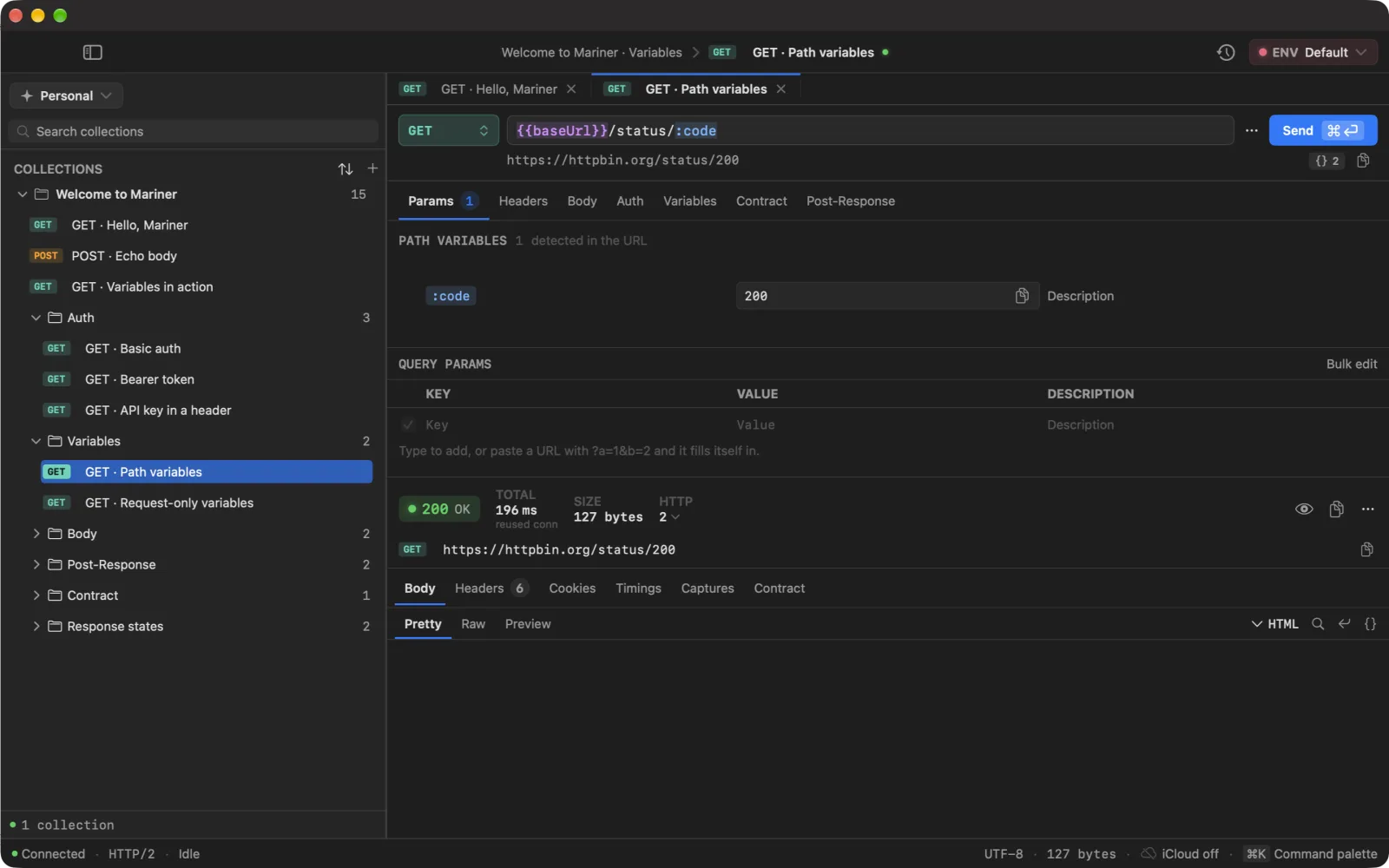
In the field itself, a token's **colour tells you its state** and the `{{ }}` / `:` syntax tells you its family — so the two ways of being broken look the same on both:
- **Violet** {{token}} — resolved through the environment cascade.
- **Blue** :slug — a path variable of this request, filled in.
- **Amber** {{token}} · :slug — declared, but its value is empty. It substitutes to nothing, which silently drops a path segment.
- **Red** {{token}} · :slug — not declared anywhere. It goes on the wire literally.
Hovering a token shows its value and which layer it came from.
VARIABLES · {{baseUrl}} from the environment, :code from Params — resolved right under the field
## Switch environments
Three ways, fastest first:
- ⌘E opens the picker from anywhere — arrow to an environment, press ↩.
- ⌘K and type the environment's name: *Switch Environment › Production*.
- Click the **● ENV** pill in the toolbar.
Choosing **No Environment** leaves only request-local variables in play. When you switch workspace, Mariner keeps the environment with the same name active if the new workspace has one.
## Manage variables
Right-click a variable in the manager for **Duplicate**, **Copy to Environment ▸**, **Move to Environment ▸** and **Delete**. Copying or moving to another environment replaces a variable with the same key there — handy for promoting a value from Staging to Production. Right-click an environment for **Rename**, **Duplicate** (variables included) and **Delete**.
---
Source: https://marinerhttp.dev/docs/environments · Mariner docs