# Your first request
> Mariner opens with a small sample collection so you can send something in the first ten seconds. This page walks through that request and names every part of the window you will use afterwards.
## Send the sample request
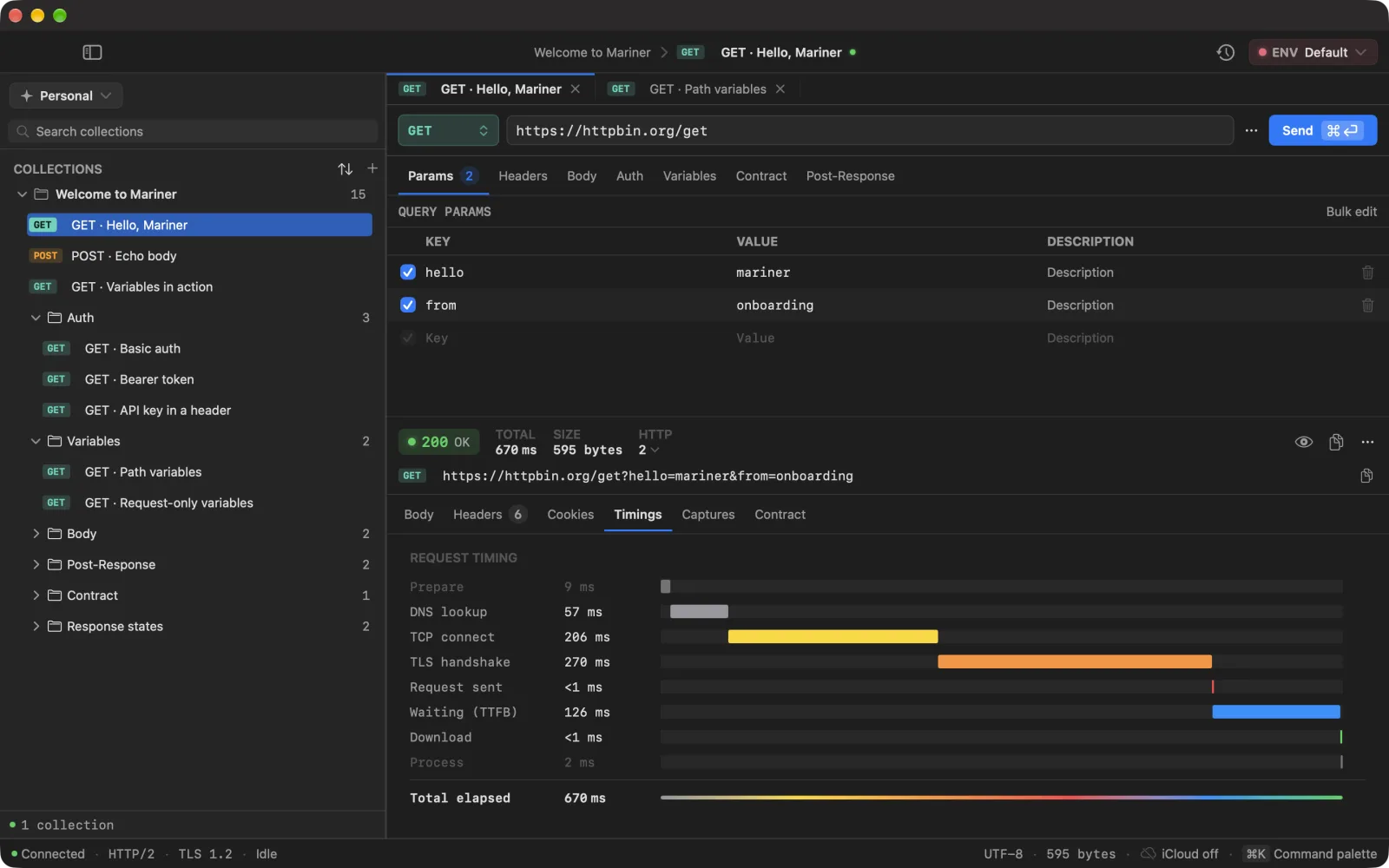
On first launch Mariner creates a workspace called **Personal** with a collection named **Welcome to Mariner**: requests against `httpbin.org` that echo back whatever you send — three at the root, and a folder per surface of the editor (Auth, Variables, Body, Post-Response, Contract, Response states). The first one is already open.
1. Press ⌘↵ (or click **Send**). The response lands in the lower pane with its status, size and timing.
2. Open the **Timings** tab to see where the milliseconds went — DNS, TCP, TLS, waiting, download.
3. Open the second request, **POST · Echo body**, and press ⌘↵ again: the JSON body you see in the editor comes back in the response.
4. Open **GET · Variables in action**. Its URL starts with `{{baseUrl}}`, a variable already defined in the **Default** environment. Hover the token to see what it resolves to.
## The request editor
The bar above the editor reads left to right: method, URL, the ⋯ menu, **Send**. Click into the URL and the field stops truncating: it wraps and grows downward over the pane, so a long URL is readable while you edit it and compact again as soon as you leave.
Under it sit the resolved URL — what will actually go on the wire — and a {} chip with the number of tokens the request depends on. Open the chip for the whole URL over as many lines as it needs, and a list of every {{token}} and :slug with what each one contributes; see [Set up environments](/docs/environments).
- **Params** — query parameters, plus anything you typed straight into the URL (shown read-only), plus **path variables** such as `:id`.
- **Headers** — key/value rows with autocomplete for standard header names. Headers Mariner adds on its own (`Content-Type` for a JSON body, for example) appear in a read-only *temporary headers* section.
- **Body** — none, raw, JSON, form-urlencoded or multipart. JSON gets a formatter and a live valid/invalid indicator; multipart lets you attach files.
- **Auth** — see [Authentication](/docs/auth).
- **Variables** — values that belong to this request only; see [Variables and secrets](/docs/variables).
- **Contract** — the shape every response to this request is measured against; see [Contracts](/docs/contracts).
- **Post-Response** — rules that copy values out of the response into variables.
Every key/value table has a **Bulk edit** button: paste `key: value` lines and apply with ⌘↵.
## The response pane
- **Body** — *Pretty*, *Raw*, *Tree* (JSON only) and *Preview* (HTML). ⌘F searches inside the body; ⌘G jumps to the next match. Large bodies are truncated in the viewer, never in the file you save with *Save body to file…*.
- **Headers** and **Cookies** — one row each, with counts on the tab.
- **Timings** — the waterfall. Grey phases are Mariner's own preparation; coloured ones are the network.
TIMINGS · where 670 ms went — 126 of them waiting for the first byte
- **Captures** — what the Post-Response rules extracted this time.
The strip above the tabs shows the status, total time, whether the connection was reused, HTTP version, remote IP, size, gzip savings, and — when the server sends them — rate-limit headers and the clock skew between the server and your Mac.
## Cold start and cancel
Right-click **Send** for **Send (cold start)**: Mariner drops the cached connection so the next timing includes DNS, TCP and TLS from scratch. The ⋯ menu also has a persistent **Cold mode** for a request that should never hit a cache.
While a request runs, **Send** becomes **Cancel**. Each tab has its own runner, so cancelling one never touches another.
## Tabs and the palette
- ⌘T creates a request in the active collection.
- Requests open in tabs: ⌘1–⌘9 jump to a tab, ⌘⌥→ / ⌘⌥← move between them, ⌘W closes the current one. Twenty tabs is the ceiling: each one holds on to its last response, so the cap is what stops a long session from adding up. Mariner turns down the twenty-first rather than closing one of yours.
- ⌘⌥9 hides the editor, ⌘⌥0 hides the response, so either can take the whole window.
- ⌘K opens the command palette: every request, collection, environment and action in one fuzzy-searched list. It is the fastest way to send a request you have not opened yet.
---
Source: https://marinerhttp.dev/docs/first-request · Mariner docs