# MCP server
> Mariner includes a local MCP server so Claude Code, Cursor, Windsurf or VS Code can read your collections, resolve environments and run requests — with the same local data, and without an API key ever leaving your Mac.
## Turn it on
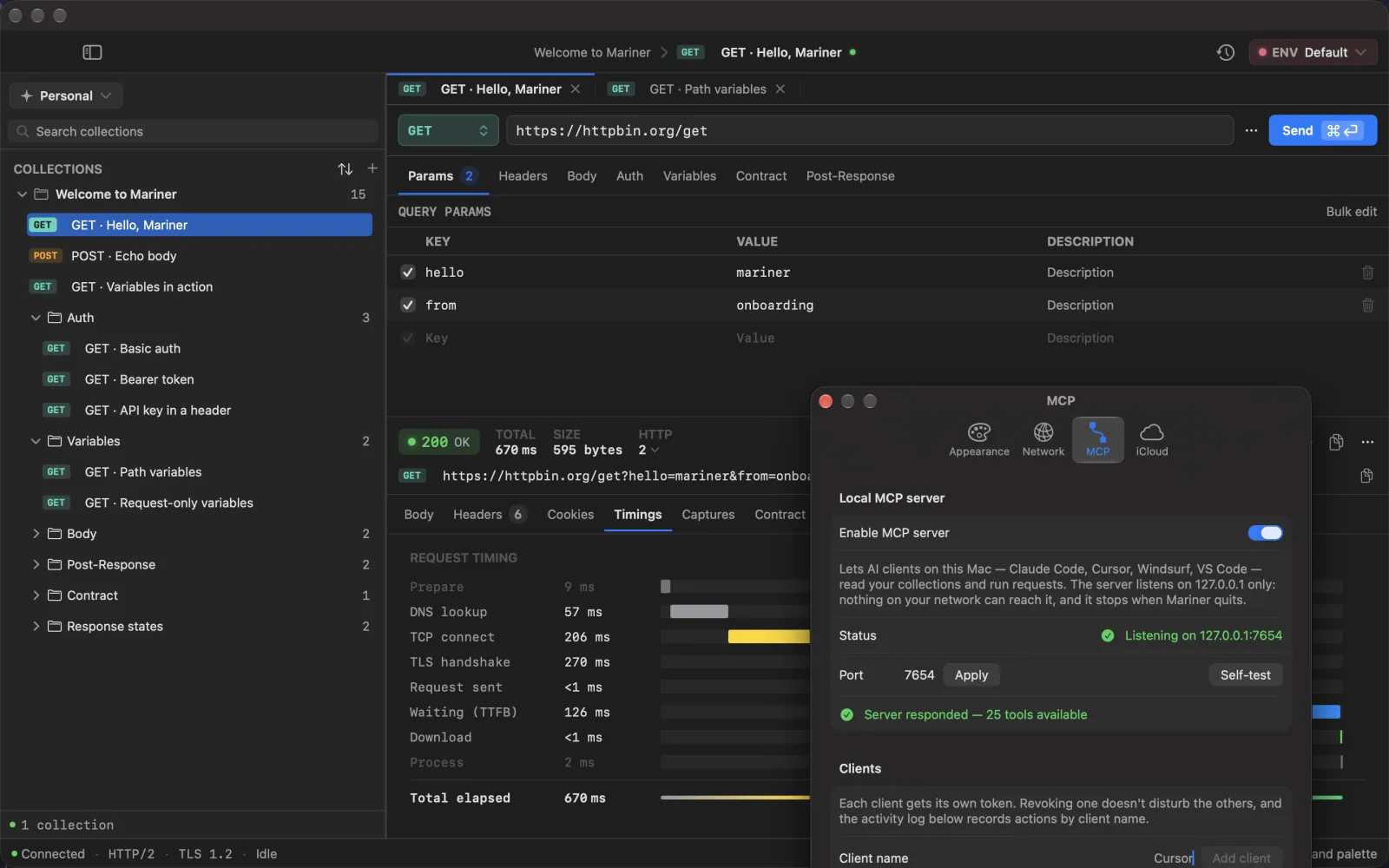
1. Open ⌘, → **MCP** and switch on **Enable MCP server**. The status line reads *Listening on 127.0.0.1:7654* (change the port there if 7654 is taken; ports up to 1024 are refused).
2. Under **Clients**, type a name — `Claude Code`, `Cursor` — and click **Add client**. Mariner shows a token **once**; copy it now.
3. Under **Reachable workspaces**, tick the workspaces the agent may see. Nothing is reachable until you tick it, and untouched workspaces are not listed at all, so an agent never learns they exist.
4. Click **Self-test** to confirm the server answers. The **Activity** list at the bottom shows the last calls, by client name and tool.
The server listens on the loopback address only and stops when Mariner quits. Every request must carry the token as a bearer header; without it the server answers 401.
SETTINGS → MCP · loopback only, and the self-test proves it answers
## Connect a client
**Claude Code**
```bash
claude mcp add --transport http mariner http://127.0.0.1:7654/mcp --header "Authorization: Bearer "
```
**Cursor, Windsurf, VS Code** — add to `mcp.json`:
```json
{
"mcpServers": {
"mariner": {
"url": "http://127.0.0.1:7654/mcp",
"headers": { "Authorization": "Bearer " }
}
}
}
```
Both snippets are also in Settings with a **Copy** button. Claude Desktop has no HTTP transport of its own — point it at the same URL through the `mcp-remote` bridge.
## What an agent can do
Reading and running:
| Tool | Purpose |
|---|---|
| `list_workspaces` | The workspaces you ticked |
| `list_collections` | Collections and the requests inside |
| `get_request` | Full config of one request — credentials redacted |
| `send_request` | Run a request with the active environment; capture rules apply |
| `run_collection` | Run a collection in order (up to 50 requests) and report pass/fail |
Environments:
| Tool | Purpose |
|---|---|
| `list_environments` | Environments and variables, secrets masked, active one flagged |
| `set_variable` · `add_variable` · `rename_variable` · `remove_variable` | Edit **non-secret** variables; each call returns what it replaced |
| `audit_environments` | Cross-check environments against each other and against the requests: missing keys, unused variables, undefined `{{refs}}`, values that look like credentials |
| `clone_environment` | Copy an environment, secret slots left empty |
| `set_active_environment` | Switch the active environment of the open workspace |
Bodies and contracts:
| Tool | Purpose |
|---|---|
| `list_body_variants` · `set_body_variant` · `activate_body_variant` | The named payloads a request keeps ("Default", "missing email", "422"). Writes return what they replaced; nothing is ever deleted |
| `get_contract` · `set_contract` | Read the [contract](/docs/contracts) a request promises, or store one — `derive_from_response: true` sends once and derives it |
| `check_contract` | Send and check against the contract. `variants: "all"` runs every saved payload in turn and restores the one that was active |
| `check_collection_contracts` | "Did this API change?" for a whole collection; requests without a contract are reported as unchecked |
Creating:
| Tool | Purpose |
|---|---|
| `create_collection` · `add_requests` | New collections and requests; existing ones are reported, never overwritten |
| `create_environment` | A new workspace environment with non-secret variables |
| `import_openapi` · `import_curl` | The same importers you use from the File menu |
There is deliberately **no tool that updates or deletes** a collection or a request. An agent can add and run; reshaping what you built stays a human job.
## Secrets stay home
- Variables marked secret are returned as *set* or *empty*, never with their value.
- Headers, query values and JSON body fields whose key looks like a credential come back as ``.
- An agent cannot write a secret: the tools refuse credential-looking values and ask for an empty slot you fill in yourself.
- Response bodies handed to the agent are cut at 32,000 characters.
## For agents reading this
These docs are machine-readable too: [`/llms.txt`](/llms.txt) is a link-first index, [`/llms-full.txt`](/llms-full.txt) carries every page in one file, and any page is plain Markdown when you append `.md` to its URL — this one is [`/docs/mcp.md`](/docs/mcp.md). Point your agent at the index and it can read the tool list and the connection steps without scraping HTML.
---
Source: https://marinerhttp.dev/docs/mcp · Mariner docs