# Mariner — documentation
> Complete user docs for Mariner, the native macOS REST client. Index: https://marinerhttp.dev/llms.txt
# Installation
> Mariner ships on the Mac App Store for macOS 15 and later. Every feature is free for a month; then it is a yearly subscription or a one-time purchase.
## Requirements
- macOS 15 (Sequoia) or later, Apple silicon or Intel.
- An App Store account to install it. Mariner itself never asks you to sign in.
## Install
1. Get Mariner from the Mac App Store and open it.
2. Mariner creates a workspace named **Personal** with a sample collection so there is something to send right away — see [Your first request](/docs/first-request).
That is the whole setup. There is no account to create.
## The free month
On first launch Mariner offers a free month of everything. Confirm it in the App Store sheet and every feature is unlocked; after the month it is **US$29.99 a year** unless you cancel at least 24 hours before it ends. You can also buy Mariner once for **US$79.99**. Both plans are the same app — see [Pricing and the free month](/docs/free-and-pro).
Prefer to look first? **Look around first** opens the app read-only: you can browse the sample collection and export anything, and the offer stays in the toolbar. Your purchase follows your Apple Account rather than the machine: on another Mac, open the plans and press **Restore Purchase**. **Family Sharing** is enabled.
Without a subscription nothing is ever deleted — everything stays readable and exportable; editing and sending wait until you subscribe.
## Language
Mariner is available in English, Spanish and Brazilian Portuguese and follows the macOS language setting. To run it in a different language than the system, open **System Settings → General → Language & Region → Applications**, add Mariner and pick the language; relaunch the app.
## Settings at a glance
Open Settings with ⌘,.
- **Appearance** — reduce motion, reduce haptic feedback, and whether to track exploration milestones (the small log under **Help → Exploration Log**).
- **Network** — the app-wide HTTP proxy with host, port and a bypass list. See [Mac integration](/docs/system#proxy).
- **MCP** — the local server that lets agents use your collections. See [MCP server](/docs/mcp).
- **iCloud** — the sync toggle and its status. See [Mac integration](/docs/system#icloud-sync).
---
Source: https://marinerhttp.dev/docs/install · Mariner docs
# Your first request
> Mariner opens with a small sample collection so you can send something in the first ten seconds. This page walks through that request and names every part of the window you will use afterwards.
## Send the sample request
On first launch Mariner creates a workspace called **Personal** with a collection named **Welcome to Mariner**: requests against `httpbin.org` that echo back whatever you send — three at the root, and a folder per surface of the editor (Auth, Variables, Body, Post-Response, Contract, Response states). The first one is already open.
1. Press ⌘↵ (or click **Send**). The response lands in the lower pane with its status, size and timing.
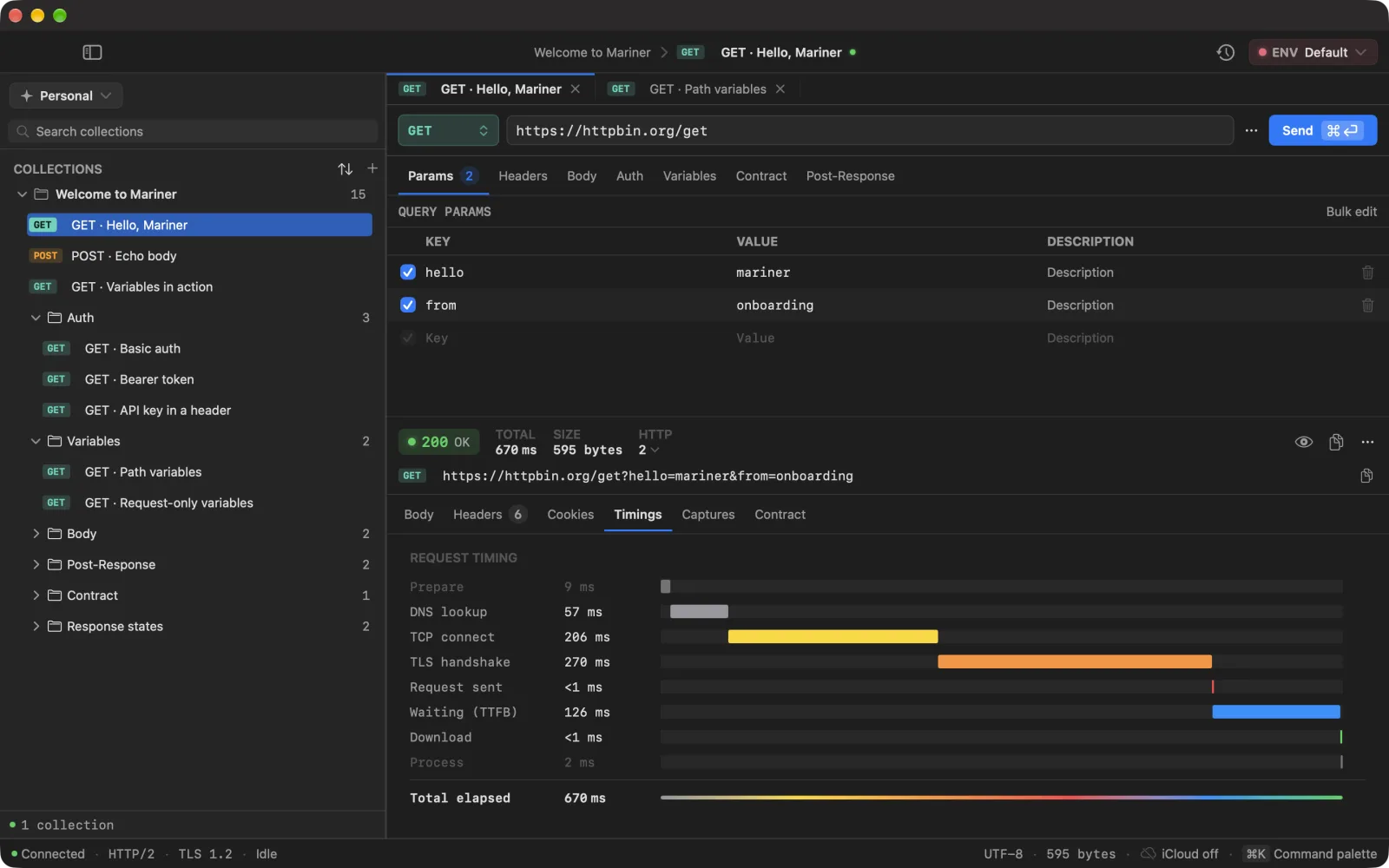
2. Open the **Timings** tab to see where the milliseconds went — DNS, TCP, TLS, waiting, download.
3. Open the second request, **POST · Echo body**, and press ⌘↵ again: the JSON body you see in the editor comes back in the response.
4. Open **GET · Variables in action**. Its URL starts with `{{baseUrl}}`, a variable already defined in the **Default** environment. Hover the token to see what it resolves to.
## The request editor
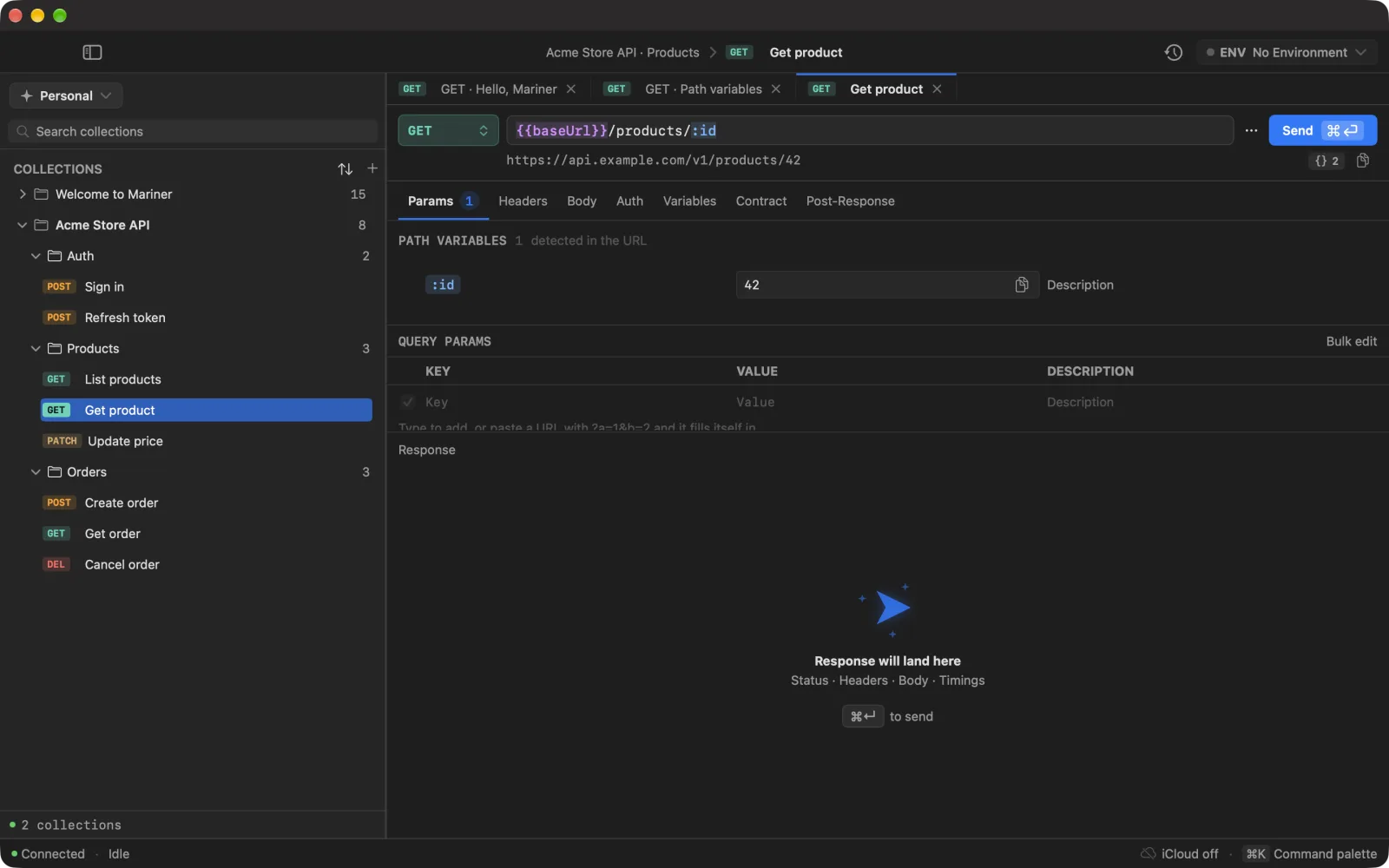
The bar above the editor reads left to right: method, URL, the ⋯ menu, **Send**. Click into the URL and the field stops truncating: it wraps and grows downward over the pane, so a long URL is readable while you edit it and compact again as soon as you leave.
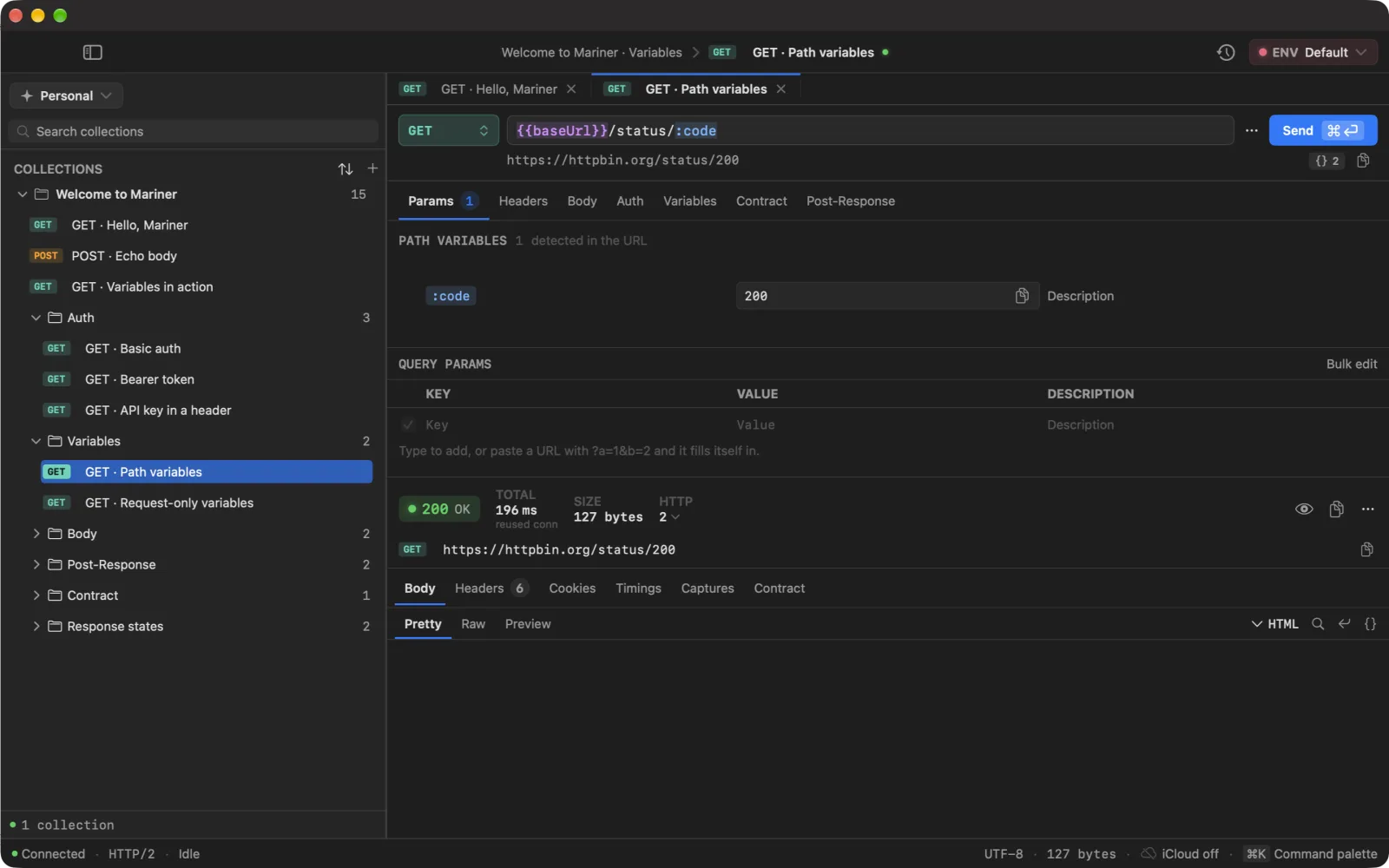
Under it sit the resolved URL — what will actually go on the wire — and a {} chip with the number of tokens the request depends on. Open the chip for the whole URL over as many lines as it needs, and a list of every {{token}} and :slug with what each one contributes; see [Set up environments](/docs/environments).
- **Params** — query parameters, plus anything you typed straight into the URL (shown read-only), plus **path variables** such as `:id`.
- **Headers** — key/value rows with autocomplete for standard header names. Headers Mariner adds on its own (`Content-Type` for a JSON body, for example) appear in a read-only *temporary headers* section.
- **Body** — none, raw, JSON, form-urlencoded or multipart. JSON gets a formatter and a live valid/invalid indicator; multipart lets you attach files.
- **Auth** — see [Authentication](/docs/auth).
- **Variables** — values that belong to this request only; see [Variables and secrets](/docs/variables).
- **Contract** — the shape every response to this request is measured against; see [Contracts](/docs/contracts).
- **Post-Response** — rules that copy values out of the response into variables.
Every key/value table has a **Bulk edit** button: paste `key: value` lines and apply with ⌘↵.
## The response pane
- **Body** — *Pretty*, *Raw*, *Tree* (JSON only) and *Preview* (HTML). ⌘F searches inside the body; ⌘G jumps to the next match. Large bodies are truncated in the viewer, never in the file you save with *Save body to file…*.
- **Headers** and **Cookies** — one row each, with counts on the tab.
- **Timings** — the waterfall. Grey phases are Mariner's own preparation; coloured ones are the network.
TIMINGS · where 670 ms went — 126 of them waiting for the first byte
- **Captures** — what the Post-Response rules extracted this time.
The strip above the tabs shows the status, total time, whether the connection was reused, HTTP version, remote IP, size, gzip savings, and — when the server sends them — rate-limit headers and the clock skew between the server and your Mac.
## Cold start and cancel
Right-click **Send** for **Send (cold start)**: Mariner drops the cached connection so the next timing includes DNS, TCP and TLS from scratch. The ⋯ menu also has a persistent **Cold mode** for a request that should never hit a cache.
While a request runs, **Send** becomes **Cancel**. Each tab has its own runner, so cancelling one never touches another.
## Tabs and the palette
- ⌘T creates a request in the active collection.
- Requests open in tabs: ⌘1–⌘9 jump to a tab, ⌘⌥→ / ⌘⌥← move between them, ⌘W closes the current one. Twenty tabs is the ceiling: each one holds on to its last response, so the cap is what stops a long session from adding up. Mariner turns down the twenty-first rather than closing one of yours.
- ⌘⌥9 hides the editor, ⌘⌥0 hides the response, so either can take the whole window.
- ⌘K opens the command palette: every request, collection, environment and action in one fuzzy-searched list. It is the fastest way to send a request you have not opened yet.
---
Source: https://marinerhttp.dev/docs/first-request · Mariner docs
# Set up environments
> An environment is a set of variables — base URL, tokens, headers — that you switch in one go. Define one for local, staging and production, and swap between them without touching a single request.
## Create an environment
1. Press ⌘⇧E to open **Manage Environments**, or pick it from the **● ENV** pill at the right end of the toolbar.
2. Click **New environment**. It appears in the list already in rename mode; type a name — `Staging`, `Production` — and press ↩. The coloured dot next to it is derived from the name, so the same name always gets the same colour.
3. Add variables on the right: a **KEY**, a **VALUE**, and whether the row is **Enabled** and **Secret**. `BASE_URL` and `API_KEY` are the usual first two.
You can also start from the command palette: ⌘K, then *New Environment…*.
Environments belong to the workspace you are in. The first workspace ships with one called **Default**, which already holds the `baseUrl` used by the sample requests.
## Use variables in a request
Wrap the name in double braces anywhere a value goes: URL, query parameters, headers, body, auth fields. Mariner resolves it against the active environment when you send.
POST URL bar
```text
{{BASE_URL}}/launch/v1/manifests?key={{API_KEY}}
```
With **Staging** active, `{{BASE_URL}}` resolves to `https://staging.acme-labs.dev`. Switch to **Production** and the same requests point at the real server.
Under the URL field a preview row shows the exact URL that will go on the wire, with secrets masked; the copy button next to it copies the real thing.
In the field itself, a token's **colour tells you its state** and the `{{ }}` / `:` syntax tells you its family — so the two ways of being broken look the same on both:
- **Violet** {{token}} — resolved through the environment cascade.
- **Blue** :slug — a path variable of this request, filled in.
- **Amber** {{token}} · :slug — declared, but its value is empty. It substitutes to nothing, which silently drops a path segment.
- **Red** {{token}} · :slug — not declared anywhere. It goes on the wire literally.
Hovering a token shows its value and which layer it came from.
VARIABLES · {{baseUrl}} from the environment, :code from Params — resolved right under the field
## Switch environments
Three ways, fastest first:
- ⌘E opens the picker from anywhere — arrow to an environment, press ↩.
- ⌘K and type the environment's name: *Switch Environment › Production*.
- Click the **● ENV** pill in the toolbar.
Choosing **No Environment** leaves only request-local variables in play. When you switch workspace, Mariner keeps the environment with the same name active if the new workspace has one.
## Manage variables
Right-click a variable in the manager for **Duplicate**, **Copy to Environment ▸**, **Move to Environment ▸** and **Delete**. Copying or moving to another environment replaces a variable with the same key there — handy for promoting a value from Staging to Production. Right-click an environment for **Rename**, **Duplicate** (variables included) and **Delete**.
---
Source: https://marinerhttp.dev/docs/environments · Mariner docs
# Variables and secrets
> Where a value can come from, in which order Mariner looks, how to keep credentials out of exports, and how to capture values from a response so the next request already has them.
## Where values come from
Mariner resolves each `{{name}}` through a cascade. The last layer that defines the key wins:
1. **Global variables** — attached to no workspace and no collection. Nothing in the app creates them; they arrive with an imported `.mariner` package.
2. **The collection's own variables** — imported from a Postman collection as *‹Collection› Variables*. There is nothing to pick here: they apply to everything inside that collection.
3. **The active workspace environment** — the one shown in the **● ENV** pill.
4. **Request-local variables** — the **Variables** tab of the request itself. Use them for a value that makes sense nowhere else; they win over the environment.
The order is Postman's own (global < collection < environment < local), so a collection you imported sends the same request in both apps. Hover a token in the URL to see which layer its value came from.
A variable's value may itself contain other tokens; Mariner resolves up to five levels deep and leaves a cycle as literal text.
## Built-in dynamic variables
These produce a fresh value on every send and never need defining:
| Token | Value |
|---|---|
| `{{$uuid}}` / `{{$guid}}` | A random UUID |
| `{{$timestamp}}` | Seconds since 1970 |
| `{{$isoTimestamp}}` | The current time in ISO 8601 |
| `{{$randomInt}}` | An integer between 0 and 1000 |
## Path variables
A segment such as `/users/:id` becomes a row in the **Path variables** section of the **Params** tab. Fill it in and the segment is replaced at send time; leave it empty and Mariner blocks the send until you do. Port numbers and `https:` are not mistaken for path variables — only a colon that follows a slash counts.
## Secrets
Tick **Secret** on a variable and its value is masked wherever it appears: the environment list, the URL preview, the generated code. Reveal it on demand with the eye toggle.
- Secret values are **left out of every export** — the `.mariner` package and the Postman file keep the key and its flags with an empty value, so the recipient fills in their own.
- The generated-code sheet has an **Include secrets** switch that is off by default, and warns you when you turn it on.
- Secret variables sync with iCloud like any other variable, because they are part of the environment. Credentials entered in the **Auth** tab are different: those go to the macOS Keychain and never leave the Mac — see [Authentication](/docs/auth).
## Capture values from a response
The **Post-Response** tab holds capture rules: after a response arrives, take a value out of it and write it into a variable. A login request that saves its token is the classic case.
1. Click **Add rule** and choose a **source**: a JSON path in the body (`$.token`, `$.data.items[0].id`), a header, a cookie, or the status code.
2. Choose the **target**: the active workspace environment or the request's own variables, and the key to write.
3. Optionally restrict the rule to a status range. The default is 200–299, so a failed login never overwrites a good token.
Every rule shows a live preview against the last response, and the value picker lets you click a node in the JSON instead of typing its path. Results appear in the **Captures** tab of the response. During a collection run captures from one request are visible to the next, which is what makes a *login → list → detail* sequence work unattended.
The JSON path syntax is deliberately small: `$`, dotted keys and numeric indexes. No wildcards, no filters.
---
Source: https://marinerhttp.dev/docs/variables · Mariner docs
# Collections
> Workspaces hold collections; collections hold folders and requests. This page covers the sidebar — creating, moving, duplicating — and how Mariner keeps several projects apart.
## Workspaces
A workspace is the outer box: its own collections, its own environments, its own default auth, and its own cookie jar, so being logged in on one project never leaks into another. Mariner starts with one called **Personal**.
- Switch with ⌘⇧] and ⌘⇧[, from the switcher at the top of the sidebar, or with ⌘K → *Switch Workspace › name*.
- The switcher also offers **New Workspace…**, **Rename…** and **Delete…**.
- Mariner remembers which workspace and environment were active and restores them on the next launch.
## The tree
A collection contains folders and requests, nested as deep as you like. New items get a name in your language — *New Collection*, *New Folder*, *New Request* — and open in rename mode.
- **Collection** (right-click): Add Request, Add Folder, Import from cURL…, Run Collection…, Edit Auth…, Export as Mariner…, Export as Postman…, Rename, Duplicate, Delete.
- **Folder**: Add Request, Add Folder, Import from cURL…, Rename, Duplicate, Move to…, Run Folder…, Edit Auth…, Delete.
- **Request**: Open in new tab, Rename, Duplicate, Move to…, Run request, Generate Code… (⌘⇧C), Copy as cURL (⌘⌥C), Delete.
Duplicates are named *X copy*, then *X copy 2*. Double-click any name to rename it; ↩ commits, ⎋ cancels. Deleting a collection or a non-empty folder asks first.
## Sorting and search
The header above the tree carries a sort control (`↑↓`) to the left of the **+**. It is always visible, and it takes the accent colour whenever the list is not in its resting order — so the icon itself answers "why are they in this order?".
- **Name** — Finder's order: case and accents ignored, digits compared as numbers, so `api-v9` sorts before `api-v10`.
- **Recently used** — most recently executed first. A collection whose last run has already dropped out of the history window counts as never used, and those go to the end alphabetically — also when you reverse the order, because "oldest first" does not mean "the ones I know nothing about first".
- **Number of requests** — counting the whole subtree, not just the root.
- **Manual** — the order you left them in, and the resting state. It is also the one to be in while you drag rows around: under any other criterion a dropped row springs straight back.
Each criterion can be reversed — *A→Z / Z→A*, *Newest first / Oldest first*, *Most requests first / Fewest requests first* — and the choice is **saved per workspace**, so moving to another project never inherits the previous one's order. While anything other than Manual is active, the sidebar footer names it next to the collection count, and doubles as the same menu.
The search field above the tree reaches **collections, folders and requests** — a request also matches on its URL and its method. Containers are listed first: typing the name of a collection should take you to that collection, not to everything inside it.
## Drag and drop
Every row is draggable. Each row has three drop zones: the top edge inserts **before**, the bottom edge inserts **after**, and the middle drops **into** a folder (or after a request). Dropping on a collection header moves the item to the root of that collection. **Move to…** does the same from a sheet when the target is far away.
## Auth and variables at collection level
A collection or folder can carry its own authentication that every request below it inherits, and a request can override it. The full chain is described in [Authentication](/docs/auth). Environments are per workspace, not per collection — see [Set up environments](/docs/environments).
## Running, exporting, importing
- **Run Collection…** (⌘R) or **Run Folder…** executes the subtree in order; see [Runner](/docs/runner).
- **Export as Mariner…** (⌘⇧X) writes a `.mariner` package you can commit or send to a teammate; **Export as Postman…** writes a v2.1 collection. Secrets are stripped from both. Formats are documented in [File format](/docs/file-format).
- Importing from cURL, Postman, OpenAPI or another Mariner export is covered in [Import from other clients](/docs/import).
---
Source: https://marinerhttp.dev/docs/collections · Mariner docs
# Authentication
> Basic, Bearer, API key and both common OAuth 2.0 flows, set once at the workspace, collection or folder and inherited by everything below. Credentials live in the macOS Keychain.
## Where auth is set
Authentication can be configured at four levels. When a request is sent, Mariner walks up from the request until it finds a concrete setting:
1. The request's own **Auth** tab.
2. The nearest **folder** with an override (folders → *Edit Auth…*).
3. The **collection** (right-click → *Edit Auth…*).
4. The **workspace** (menu **Workspace → Edit Auth…**).
New requests and collections are set to **Inherit**, so in practice you configure the collection once and forget about it. Choosing **No Auth** at any level stops the walk: that request goes out unauthenticated even if the workspace has a token.
Every text field in the auth editor accepts `{{variables}}`, so the token itself can live in the environment and change with it.
## Types
- **Basic** — username and password, sent as an `Authorization: Basic` header.
- **Bearer Token** — the token goes in `Authorization: Bearer …`.
- **API Key** — a name and a value, sent either as a **header** or as a **query parameter**.
- **OAuth2 Client Credentials** — token URL, client ID, client secret, optional scope and audience. **Test fetch token** requests one right there and shows the first characters so you know it worked. Tokens are cached and refreshed before they expire.
- **OAuth2 Authorization Code** — authorization URL, token URL, client ID, scope, redirect URI, with **PKCE (S256)** on by default. **Authorize** opens the provider's login in a system web session; tick **Private session** to log in with a different account than Safari's. **Clear tokens** forgets the session. The default redirect URI is `mariner://oauth/callback` — register it with your provider.
## Where credentials are stored
Passwords, tokens, API-key values, client secrets and OAuth token sets are written to the **macOS Keychain**, not to the workspace database.
- They **do not sync** through iCloud. Enter them once on each Mac.
- They are **never exported** with a collection.
- They are deleted when the request, folder, collection or workspace that owns them is deleted.
---
Source: https://marinerhttp.dev/docs/auth · Mariner docs
# Contracts
> Derive a JSON Schema from a response that already works, and every response after it gets measured against that shape — in the response pane, in the collection runner and over MCP.
## Capture it, don't write it
Nobody writes a JSON Schema by hand, which is why contract testing usually never starts. Mariner runs the gesture the other way round:
1. Send the request while the API is behaving.
2. Open the **Contract** tab of the request editor — between Variables and Post-Response — and press **Derive from response**.
3. That's the contract. Every response from now on is measured against it.
The tab carries a `•` whenever the request promises a shape, so you can tell before spending a send. It opens on **Shape**: one row per field with its name, a type chip, a `REQ` mark when the schema demands it, and whatever else it demands — `format: date`, an enum's members, a range. Twenty lines of braces become eight rows you read in two seconds. **JSON** is one segment away with the document itself, and it warns the moment what you type stops being valid JSON.
**Re-derive** replaces the contract after the API legitimately changes; **Clear** drops it. Without a subscription the header shows a *Read-only* chip instead: the schema stays on screen to read, and editing it waits until you subscribe.
The schema is a JSON Schema (draft 2020-12) document, titled after the request, and it stays editable underneath — paste one translated from your Zod, Pydantic or OpenAPI definition and it works just the same.
The welcome collection ships with one already wired up: **Contract → GET · A response under contract**. Send it and the verdict appears; change `/json` to `/uuid` in the URL and watch it break.
## What "derived" means
Deriving reads the response you have, not the API you wish you had:
- **Only what was actually there is required.** For an array, a key present in every sampled element is required; a key that appears in some of them is described but optional.
- **Extra fields never break it.** `additionalProperties` is not emitted, so an API that adds a field keeps passing — the contract catches things that *disappeared* or *changed type*, which is what actually breaks a client.
- **A field that is sometimes null** comes out as `["string", "null"]` rather than as a lie.
- **A field whose samples disagreed** comes out as an empty schema — anything validates there. Guessing would reject payloads the API really sends.
- Arrays are sampled to 200 elements and nesting to 8 levels.
## The verdict, where you are already looking
- A **CONTRACT** chip sits next to the status: green when the response matches, amber with a count when fields drifted, red when the schema itself isn't valid JSON. Click it to jump to the tab.
- The response pane's **Contract** tab carries an amber badge with the number of violations — lit even when you are on another tab, because its job is to tell you from the tab you are not looking at.
- That tab is a table, not a list of complaints: every field the contract describes, with **the value that actually arrived** next to it, and the drifted ones sorted to the top with the reason on their own line. **Only differences** hides the agreeing majority, which is what makes a forty-field contract readable. Right-click a row to copy its path.
- Each violation is listed with its path (`$.slideshow.author`) and what went wrong: *Expected string, got integer*, *Required field `id` is missing*, and so on. The list stops at 100.
- No contract, or a response that isn't JSON? Nothing is shown. A permanent "no contract" chip over the 90% of requests that will never have one is exactly what teaches people to stop reading the strip.
**A broken contract never fails the request.** The server answered; the status is what it is. Validation is advisory and says so — it reports which field moved, and leaves the verdict on the send to HTTP.
## What the validator covers
Structure (`type`, `properties`, `required`, `items`, `additionalProperties`), values (`enum`, `const`, `minimum` / `maximum`, `minLength` / `maxLength`, `pattern`, `minItems` / `maxItems`, `uniqueItems`, `multipleOf`) and composition (`anyOf`, `allOf`, `oneOf`, `not`, plus local `$ref` into `$defs`).
Not implemented, on purpose: `$dynamicRef`, `unevaluatedProperties` and remote `$ref` resolution — they show up in spec test suites, not in a schema derived from your own endpoint. `format` is treated as the annotation the spec says it is: a `"date-time"` that doesn't parse is not a failure, because half the APIs in the world would fail their own contract on that alone.
## In the collection runner
Run a collection and every request that carries a contract is checked as it goes ([Runner](/docs/runner)):
- The summary adds **Off contract** and **No contract** next to Passed / Failed — but only when at least one request in the run has a contract. A zero-drift count over nine requests nobody checks is not good news, so the two numbers always travel together.
- Each row gets a contract cell: a green seal, an amber count, a red mark for an unusable schema, or `—` when there is nothing to check.
- The exported report carries it too. The CSV has a `contract` column and the JSON a `contract` field, both with `passed`, `failed(n)`, `invalid_schema` or `not_json` — the same words an agent gets over MCP, so a CI job and an agent can talk about the same run without translating.
## From an agent
The [MCP server](/docs/mcp) exposes the same verdict, computed by the same code:
| Tool | Purpose |
|---|---|
| `get_contract` | Read the schema document a request promises |
| `set_contract` | Store a schema you built, or pass `derive_from_response: true` to send once and derive it. Returns the previous schema |
| `check_contract` | Send and check. `variants: "all"` runs every saved body variant in turn and restores the one that was active |
| `check_collection_contracts` | "Did this API change?" for a whole collection; requests without a contract are reported as unchecked, never silently skipped |
`send_request` and `run_collection` include the verdict as well, so an agent that was doing something else still learns the shape moved.
## Where the schema lives
The contract belongs to the request, not to a response: it is part of the definition, so it travels with the request through [export and import](/docs/file-format), across [iCloud sync](/docs/system#icloud-sync), and is what `get_contract` reads over MCP. Hand a `.mariner` package to a colleague and the contracts arrive with it. It is stored as the raw document — a schema you pasted from your own repo comes back out byte-identical instead of reformatted.
A request with no contract writes no key at all, so a package from someone who never touched the feature keeps exactly the shape it had.
---
Source: https://marinerhttp.dev/docs/contracts · Mariner docs
# Runner
> Run a whole collection or folder in order, stop or continue on failure, feed captured values from one request into the next, and export the report.
## Start a run
- ⌘R runs the collection of the request you are on (**Run → Run Collection…**).
- Right-click a collection or a folder in the sidebar for **Run Collection…** / **Run Folder…**.
- ⌘K → *Run Collection · name*.
The run sheet lists every request in the subtree, depth-first in sidebar order, each with a checkbox. **Select All** / **Deselect All** and a *n of m selected* counter sit above the list.
## Options
- **Stop on failure** (default) or **Continue on failure**.
- **Delay** between requests, in milliseconds.
A request **passes** when the network call completes and the status is between 200 and 399. Anything else — 4xx, 5xx, timeouts, DNS errors — fails. A [contract](/docs/contracts) that no longer holds is reported in its own column and never flips a request to failed: the server answered.
## Captures flow forward
Before each request the runner rebuilds the variable cascade, so values captured by an earlier request (a token, an id) are already available to the next one. A *login → create → fetch* chain runs unattended with three capture rules; see [Variables and secrets](/docs/variables).
Each step also writes a row to [History](/docs/system#history), exactly like a manual send.
## Results and report
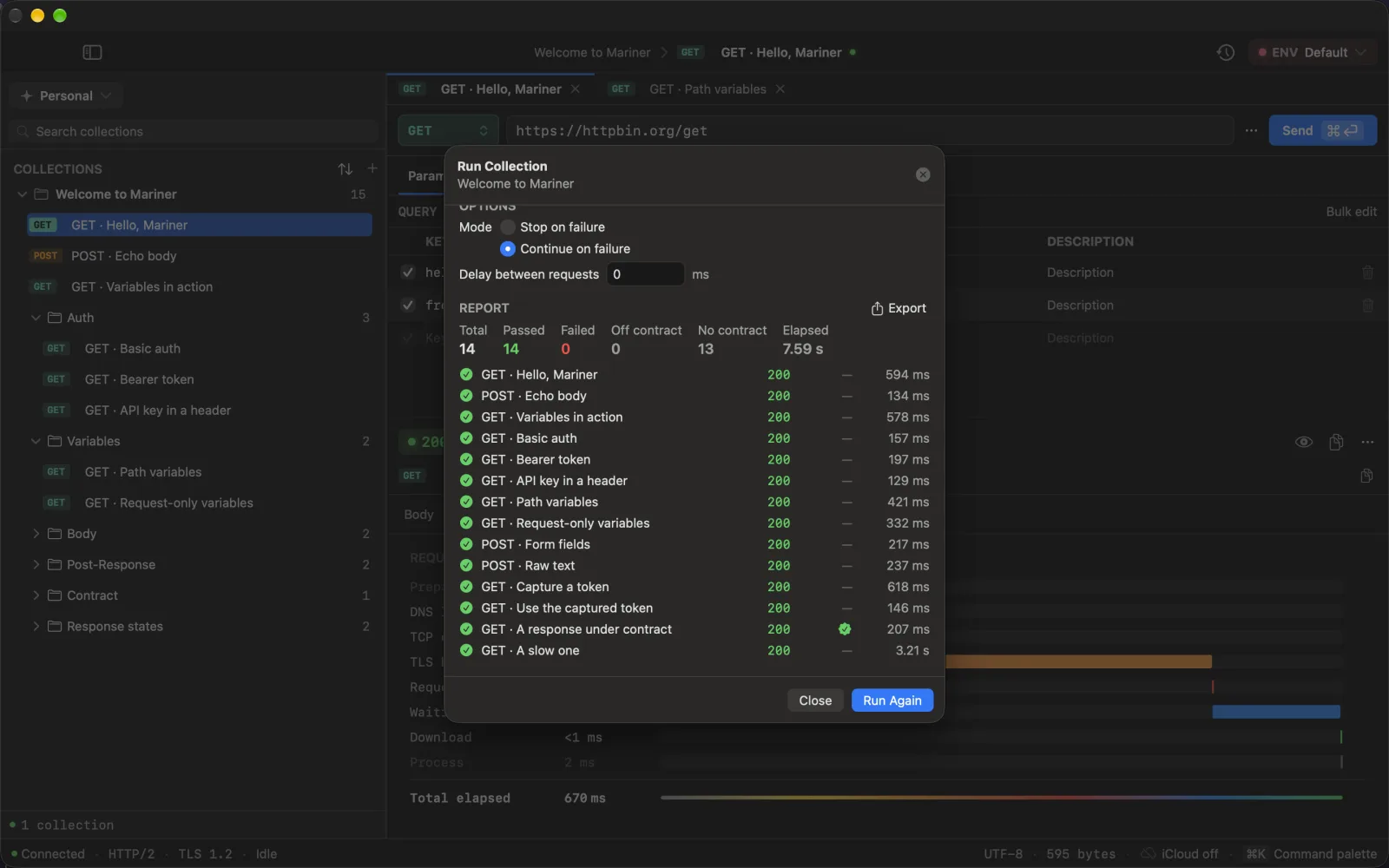
While running, the sheet shows a progress bar and *n of m*; ⎋ cancels. When done you get **Total / Passed / Failed / Elapsed**, one row per request with method, status, duration, captured keys and its contract cell, and:
- **Run Failed Again** — re-runs only the requests that failed.
- **Export…** — saves the report as **JSON** or **CSV**. The CSV columns are `name, method, url, status, durationMs, error, capturedKeys, contract`; the JSON adds the timestamp, totals and whether the run was cancelled.
When at least one request in the run carries a contract, the summary also shows **Off contract** and **No contract** — the two always travel together, because a zero-drift count over nine requests nobody checks is not good news. The `contract` column reads `passed`, `failed(n)`, `invalid_schema` or `not_json`.
⌘↵ runs (or runs again) from anywhere in the sheet.
REPORT · 14 of 14, with the contract check on the one request that carries a schema
---
Source: https://marinerhttp.dev/docs/runner · Mariner docs
# MCP server
> Mariner includes a local MCP server so Claude Code, Cursor, Windsurf or VS Code can read your collections, resolve environments and run requests — with the same local data, and without an API key ever leaving your Mac.
## Turn it on
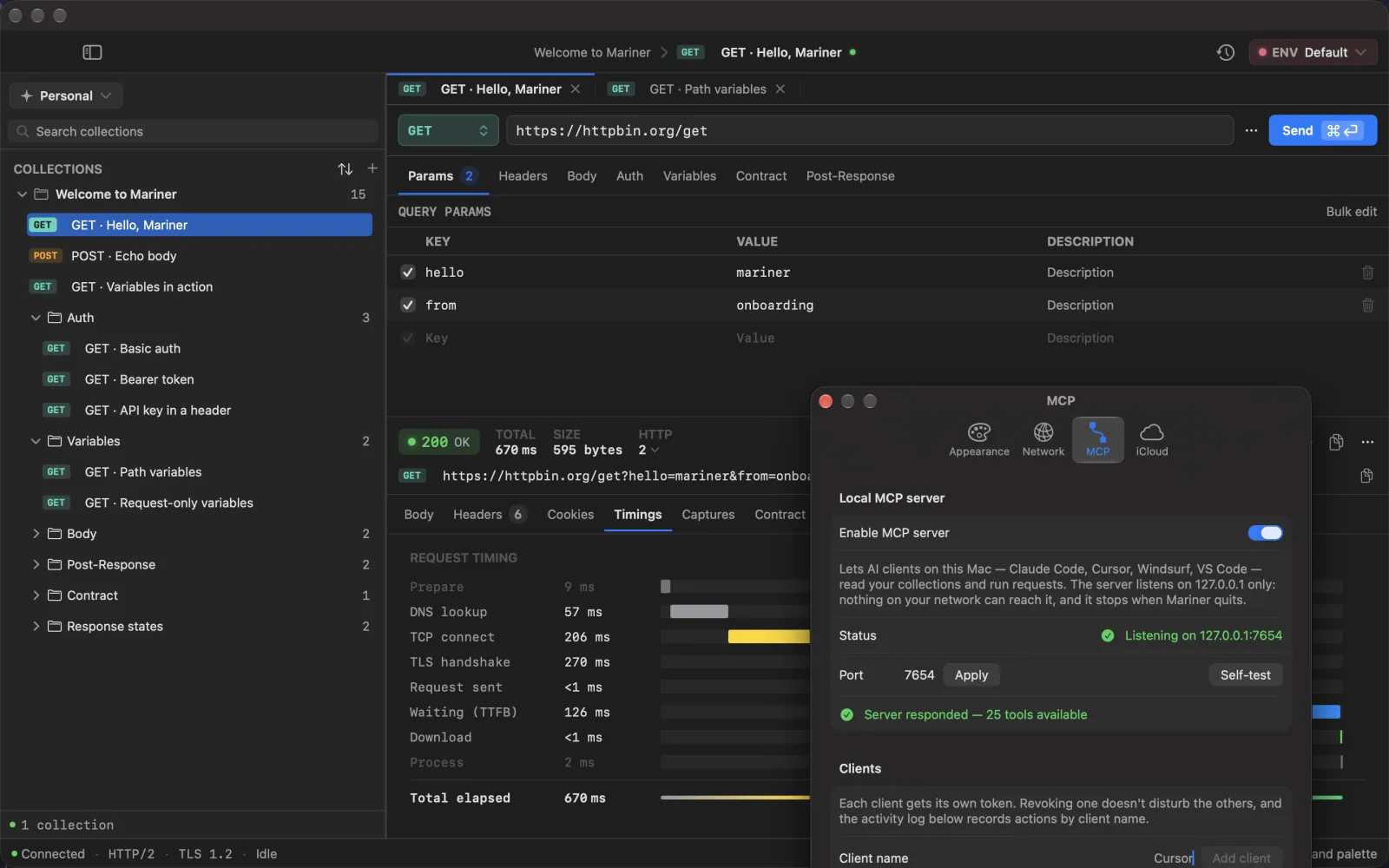
1. Open ⌘, → **MCP** and switch on **Enable MCP server**. The status line reads *Listening on 127.0.0.1:7654* (change the port there if 7654 is taken; ports up to 1024 are refused).
2. Under **Clients**, type a name — `Claude Code`, `Cursor` — and click **Add client**. Mariner shows a token **once**; copy it now.
3. Under **Reachable workspaces**, tick the workspaces the agent may see. Nothing is reachable until you tick it, and untouched workspaces are not listed at all, so an agent never learns they exist.
4. Click **Self-test** to confirm the server answers. The **Activity** list at the bottom shows the last calls, by client name and tool.
The server listens on the loopback address only and stops when Mariner quits. Every request must carry the token as a bearer header; without it the server answers 401.
SETTINGS → MCP · loopback only, and the self-test proves it answers
## Connect a client
**Claude Code**
```bash
claude mcp add --transport http mariner http://127.0.0.1:7654/mcp --header "Authorization: Bearer "
```
**Cursor, Windsurf, VS Code** — add to `mcp.json`:
```json
{
"mcpServers": {
"mariner": {
"url": "http://127.0.0.1:7654/mcp",
"headers": { "Authorization": "Bearer " }
}
}
}
```
Both snippets are also in Settings with a **Copy** button. Claude Desktop has no HTTP transport of its own — point it at the same URL through the `mcp-remote` bridge.
## What an agent can do
Reading and running:
| Tool | Purpose |
|---|---|
| `list_workspaces` | The workspaces you ticked |
| `list_collections` | Collections and the requests inside |
| `get_request` | Full config of one request — credentials redacted |
| `send_request` | Run a request with the active environment; capture rules apply |
| `run_collection` | Run a collection in order (up to 50 requests) and report pass/fail |
Environments:
| Tool | Purpose |
|---|---|
| `list_environments` | Environments and variables, secrets masked, active one flagged |
| `set_variable` · `add_variable` · `rename_variable` · `remove_variable` | Edit **non-secret** variables; each call returns what it replaced |
| `audit_environments` | Cross-check environments against each other and against the requests: missing keys, unused variables, undefined `{{refs}}`, values that look like credentials |
| `clone_environment` | Copy an environment, secret slots left empty |
| `set_active_environment` | Switch the active environment of the open workspace |
Bodies and contracts:
| Tool | Purpose |
|---|---|
| `list_body_variants` · `set_body_variant` · `activate_body_variant` | The named payloads a request keeps ("Default", "missing email", "422"). Writes return what they replaced; nothing is ever deleted |
| `get_contract` · `set_contract` | Read the [contract](/docs/contracts) a request promises, or store one — `derive_from_response: true` sends once and derives it |
| `check_contract` | Send and check against the contract. `variants: "all"` runs every saved payload in turn and restores the one that was active |
| `check_collection_contracts` | "Did this API change?" for a whole collection; requests without a contract are reported as unchecked |
Creating:
| Tool | Purpose |
|---|---|
| `create_collection` · `add_requests` | New collections and requests; existing ones are reported, never overwritten |
| `create_environment` | A new workspace environment with non-secret variables |
| `import_openapi` · `import_curl` | The same importers you use from the File menu |
There is deliberately **no tool that updates or deletes** a collection or a request. An agent can add and run; reshaping what you built stays a human job.
## Secrets stay home
- Variables marked secret are returned as *set* or *empty*, never with their value.
- Headers, query values and JSON body fields whose key looks like a credential come back as ``.
- An agent cannot write a secret: the tools refuse credential-looking values and ask for an empty slot you fill in yourself.
- Response bodies handed to the agent are cut at 32,000 characters.
## For agents reading this
These docs are machine-readable too: [`/llms.txt`](/llms.txt) is a link-first index, [`/llms-full.txt`](/llms-full.txt) carries every page in one file, and any page is plain Markdown when you append `.md` to its URL — this one is [`/docs/mcp.md`](/docs/mcp.md). Point your agent at the index and it can read the tool list and the connection steps without scraping HTML.
---
Source: https://marinerhttp.dev/docs/mcp · Mariner docs
# Import from other clients
> Paste a curl command, bring a Postman collection or an OpenAPI document, or open a package another Mariner exported. And the ways out — Postman, cURL, code, HAR.
## From a curl command
⌘⇧I, or right-click a collection or folder → **Import from cURL…**, then paste. ⌘↵ parses and shows a preview; ⌘⇧↵ imports.
Mariner understands multi-line commands with `\` continuations, and the flags that matter: `-X`, `-H`, `-d` / `--data-raw` / `--data-binary`, `--data-urlencode`, `-F` (files included), `-G`, `-u`, `-b`, `-A`, `-e`, `--url`. Flags with no equivalent — `-k`, `-L`, `--compressed`, `-o` — are ignored. A body without `-X` becomes a `POST`; the body kind is detected from the content type and shape.
An `Authorization` header or `-u user:pass` is promoted to the request's **Auth** tab, and the credential goes straight to the Keychain rather than into a header row.
## From Postman
⌘⇧O → paste the JSON or pick the file. Mariner reads **Collection v2.1** (v2.0 on a best-effort basis) and creates a new collection in the current workspace with:
- folders, recursively;
- each request's method, URL, headers, query, path variables and body, including multipart file parts;
- collection-level auth and per-folder overrides, with secrets sent to the Keychain.
Postman **environment** files are not imported — recreate them as workspace environments; it is usually a handful of keys. See [Set up environments](/docs/environments).
POSTMAN → MARINER · folders, methods and {{baseUrl}} arrive as they were
## From an OpenAPI document
**File → Import OpenAPI Spec…** accepts OpenAPI **3.0 / 3.1 in JSON** (YAML is not supported). You get a collection named after the API, one folder per tag (untagged operations land in *Uncategorized*), and a request per operation with the first JSON body example. Security schemes become collection-level auth.
Every URL is built as `{{baseUrl}}` + path, with `{braces}` turned into path variables. Add a `baseUrl` variable to your workspace environment with the server URL from the document, and the whole collection points at it.
## From another Mariner
**File → Import Mariner Collection…** and pick the `.mariner` package (a folder). The preview shows the counts of requests, folders and environments before you confirm. Secrets are never inside a package — re-enter auth tokens after importing. The legacy `.nvapi` extension still works.
## Ways out
- **Export as Mariner…** (⌘⇧X) — the package format described in [File format](/docs/file-format). Secrets excluded.
- **Export as Postman…** — a v2.1 collection file. Secrets excluded, including OAuth client secrets.
- **Copy as cURL** (⌘⌥C) — one request to the clipboard, with inherited auth resolved. **This includes real credentials**, so paste it with care.
- **Generate Code…** (⌘⇧C) — cURL, JavaScript (fetch or axios), Python requests, Swift URLSession, Go net/http. Variables are resolved by default; secrets stay masked unless you flip **Include secrets**.
- **Export HAR** — from [History](/docs/system#history), a HAR 1.2 archive of the executions currently filtered.
---
Source: https://marinerhttp.dev/docs/import · Mariner docs
# Mac integration
> The parts of Mariner that reach outside the window — iCloud sync, Shortcuts and Siri, Spotlight, the request history, the app-wide proxy and the download ceiling.
## iCloud sync
Off by default. Turn it on in ⌘, → **iCloud** and relaunch the app.
- **Syncs:** workspaces, collections, folders, requests and environments, through your private iCloud database. No Mariner server is involved.
- **Never syncs:** history and response bodies, which stay in a local store, and credentials, which stay in the Keychain of each Mac.
The cloud icon in the status bar tells the state: green when connected, *iCloud off*, *Sync error*, or *Not syncing* when a local change has waited too long for an acknowledgement. Click it for the last local save, the last iCloud event and pending changes; **Sync now** there or ⌘S anywhere forces a push. If iCloud cannot be initialised at launch, Mariner keeps working locally, switches the toggle off and shows the reason in Settings.
## Shortcuts and Siri
Mariner provides a **Run Request** action for the Shortcuts app: pick a saved request, and it runs with the workspace's active environment — even with Mariner closed — returning the response body (up to 2 KB) as a value the next action can use. Siri understands phrases like *"Run ‹request› in Mariner"* and *"Send ‹request› with Mariner"* for requests you have enabled in Shortcuts.
## Spotlight
Every request is indexed. Type its name in Spotlight and the result opens the request in Mariner.
## History
⌘⇧H opens the history of the current workspace: every execution with its status, duration, the request as it was sent and the response.
- Filter by status class (2xx … 5xx, errors), by collection, or by text over name and URL.
- Right-click a row: **Re-run** (with the request's current definition), **Open Request**, **Copy URL**, **Delete**.
- **Retention** keeps a rolling window per workspace — 200 executions by default, adjustable from 10 to 10,000 — and **Purge Now** applies it immediately. **Clear All** deletes what is currently filtered.
- **Export HAR** writes the filtered executions as a HAR 1.2 archive for tools that read it.
Response bodies are stored up to 1 MB each; anything beyond is dropped and marked as truncated. The last five executions are also one ⌘K away under *Recent*.
## Proxy
⌘, → **Network** → **Use a proxy**, with host and port, a live reachability check, and a **bypass** list (`localhost, 127.0.0.1, *.local`; a leading dot such as `.example.com` matches every subdomain). One proxy fronts both HTTP and HTTPS for the whole app.
⌘⇧P toggles it without opening Settings; a chip in the URL bar shows when traffic is being routed through it. Requests use a 30-second timeout.
When the failure belongs to the proxy rather than to the server, Mariner says so instead of blaming the network: **Proxy connection failed** — naming the host and port when the proxy is the one configured here, and pointing at System Settings when it is not —, **Proxy rejected the credentials** (Mariner does not send proxy credentials yet), **Proxy refused the tunnel** when it answers `CONNECT` with something that is not one, and **Proxy configuration failed** when the PAC file cannot be read. These used to arrive as a raw `kCFErrorDomainCFNetwork 310`, or as a TLS error pointing at a certificate that was never reached.
## Download ceiling
⌘, → **Network** also caps how much of a response body Mariner will pull into memory: **50 MB** by default, adjustable to 10, 25, 100 or 250 MB, or turned off for someone who knows they are fetching something large on purpose.
This is the only limit that acts *before* the bytes exist — the body arrives in chunks and the transfer is dropped the moment it goes over, so a 2 GB endpoint cannot make the app ask the system for 2 GB. Every other size in this page (history's 1 MB per body, the viewer's own caps) protects the disk or the render, and by the time those apply the response is already in memory.
## Exploration log
A small, optional log of milestones — first 2xx, first error, a response under 100 ms — under **Help → Exploration Log**. Switch the tracking off in **Settings → Appearance** if you would rather not.
---
Source: https://marinerhttp.dev/docs/system · Mariner docs
# Keyboard shortcuts
> Every shortcut Mariner binds, grouped by where you are. Press ⌘⇧/ inside the app for the same list.
## Everywhere
| Shortcut | Action |
|---|---|
| ⌘K | Command palette |
| ⌘T | New request in the active collection |
| ⌘E | Switch environment |
| ⌘⇧E | Manage environments |
| ⌘⇧] / ⌘⇧[ | Next / previous workspace |
| ⌘⇧H | History |
| ⌘R | Run collection… |
| ⌘⇧P | Toggle proxy |
| ⌘S | Sync now (iCloud) |
| ⌘⇧/ | Keyboard shortcuts sheet |
| ⌘, | Settings |
## Request and response
| Shortcut | Action |
|---|---|
| ⌘↵ | Send |
| Right-click **Send** | Send (cold start) |
| ⌘⌥9 | Show / hide the editor pane |
| ⌘⌥0 | Show / hide the response pane |
| ⌘F | Find in response body |
| ⌘G / ⌘⇧G | Next / previous match |
| ⎋ | Close the body search |
| ⌘⇧C | Generate code (on a request) · Copy (in the code sheet) |
| ⌘⌥C | Copy as cURL |
## Tabs
| Shortcut | Action |
|---|---|
| ⌘1 … ⌘9 | Go to tab |
| ⌘⌥→ / ⌘⌥← | Next / previous tab |
| ⌘W | Close tab (closes the window when no tab is open) |
## Import and export
| Shortcut | Action |
|---|---|
| ⌘⇧I | Import from cURL… |
| ⌘⇧O | Import Postman collection… |
| ⌘⇧X | Export collection as Mariner… |
## Sheets
| Shortcut | Action |
|---|---|
| ⌘↵ | Confirm — run, apply bulk edit, parse an import |
| ⌘⇧↵ | Import (after the preview) |
| ⎋ | Cancel · close · stop a run |
| ↩ / ⎋ | Commit / cancel an inline rename |
---
Source: https://marinerhttp.dev/docs/keyboard-shortcuts · Mariner docs
# File format
> What a Mariner export looks like on disk, so you can commit it, diff it and review it like code.
## The `.mariner` package
**Export as Mariner…** (⌘⇧X) writes a folder — a macOS package — of small JSON files, one per request, so a change to one request is a one-file diff in git.
```text
Orders API.mariner/
mariner.json manifest: name, description, ordered tree
collection-auth.json only when the collection sets its own auth
environments/
Orders API Variables.json
requests/
Auth/
_folder.json folder metadata, optional
Login.json
Orders/
List orders.json
Create order.json
```
- **`mariner.json`** carries the format `version` (currently 1), the collection name and description, and the `tree` — the exact order of folders and requests in the sidebar.
- **A request file** holds the name, method, URL, headers, query parameters, path variables, body (kind plus text or form rows), auth, request-local variables, capture rules, timeout and the response [contract](/docs/contracts) — the `contractSchema` key is written only when there is one. Saved body variants are not in the format yet; they stay on the Mac that authored them and travel through iCloud sync instead.
- **Secrets are never written.** A secret variable keeps its key and its `secret` flag with an empty value; auth credentials are not in the file at all. Whoever imports the package fills them in.
- Workspace environments are not part of a collection package — they belong to the workspace. Share them separately or recreate them; see [Set up environments](/docs/environments).
Import with **File → Import Mariner Collection…** and pick the folder. Packages written before the rename, with the `.nvapi` extension and an `nvapi.json` manifest, still import.
## Postman export
**Export as Postman…** writes `‹Name›.postman_collection.json`, Collection format v2.1: folders, requests, bodies, collection and folder auth — with every secret value and the OAuth client secret left blank.
## HAR
**Export HAR** in [History](/docs/system#history) writes a HAR 1.2 archive (`‹workspace›.har`) of the executions currently shown, including timings and bodies as stored (bodies over 1 MB are truncated and marked).
## Runner reports
The collection runner exports **JSON** — title, `generatedAt` in ISO 8601, totals, elapsed milliseconds, whether the run was cancelled, and one item per request — or **CSV** with the columns `name, method, url, status, durationMs, error, capturedKeys, contract`. Both are described in [Runner](/docs/runner).
---
Source: https://marinerhttp.dev/docs/file-format · Mariner docs
# Pricing and the free month
> Every feature is free for a month. Then Mariner is US$29.99 a year, or US$79.99 once — the same app either way. Without either, it turns read-only and nothing is deleted.
## One app, two ways to pay
There is no free tier and no feature split. Whatever you pay with, you get all of Mariner:
- **Yearly — US$29.99 a year.** Starts with a free month.
- **Lifetime — US$79.99 once.** No renewal, nothing to cancel.
The App Store shows your local price before you confirm. Both are billed to your Apple Account by Apple; there is no Mariner account and we never see your card.
## The free month
The first time you open Mariner it offers the free month. Pressing **Try Mariner Pro free for a month** opens the App Store sheet for the yearly plan with the first month at US$0 — confirm it with Touch ID or your password and every feature is unlocked on the spot.
- It is **one free month per Apple Account**. If yours already used it, the paywall offers the plans without it.
- The toolbar shows **Pro until** and the date the month ends; the chip turns amber in the last three days.
- **Unless you cancel at least 24 hours before the month ends, the first year (US$29.99) is charged when it does.** Cancel in **App Store → your name → Subscriptions**: nothing is charged, and Mariner stays unlocked until the month is over.
- Not ready yet? **Look around first** closes the offer and opens the app read-only; the offer stays in the toolbar and in the banner at the top.
## What is included
Everything, on either plan:
| | |
|---|---|
| Requests, collections, folders, workspaces, [environments](/docs/environments) | Unlimited |
| Body editors, saved [body variants](/docs/collections), response viewer, timings, cookies | All |
| [Auth](/docs/auth) | Basic, Bearer, API key, OAuth 2 browser sign-in and client credentials |
| [Import](/docs/import) | cURL, Postman, Insomnia, OpenAPI / Swagger |
| Export | `.mariner` package, Postman, cURL, Swift / Go / Python / JavaScript snippets, [HTML API docs](/docs/collections) |
| [Contracts](/docs/contracts), [request chaining](/docs/variables), the [collection runner](/docs/runner) | ✓ |
| Response → types (Swift, TypeScript, Go) | ✓ |
| [iCloud sync](/docs/system#icloud-sync) and the [MCP server](/docs/mcp) | ✓ |
## Without a subscription: read-only
If the free month ends without a subscription — or a subscription lapses — **nothing is deleted and nothing is held hostage**. Mariner turns read-only:
- Every collection, environment and request stays on your Mac, and you can open and read all of it.
- **Exporting keeps working**: a `.mariner` package, a Postman collection, a request as cURL.
- Editing, creating, importing and sending wait until you subscribe. A banner at the top says so, and trying any of them opens the plans.
- iCloud sync stops mirroring new changes, and never deletes a record on either side.
Subscribe again, or buy lifetime, and everything is editable exactly where you left it.
## Billing and cancelling
- The yearly plan **renews automatically** — including at the end of the free month — unless auto-renew is turned off at least 24 hours before the period ends.
- Cancel any time in **App Store → your name → Subscriptions**. Mariner stays unlocked until the period you already have runs out.
- **Lifetime does not cancel the yearly plan for you.** It sits outside the subscription, so if you move from yearly to lifetime, cancel the yearly plan in the same screen. Mariner warns you about this before the purchase, and shows a **Cancel yearly plan** reminder afterwards while the subscription is still set to renew.
- **Family Sharing** is on for both: one purchase covers your family group.
- Refunds go through Apple, at [reportaproblem.apple.com](https://reportaproblem.apple.com).
## Restoring on another Mac
Your purchase follows your Apple Account, not the machine. Install Mariner from the Mac App Store, open the plans from the toolbar and press **Restore Purchase**. If it comes back empty, check the Mac is signed in to the Apple Account that bought it — and if it still is, [write to us](/support).
---
Source: https://marinerhttp.dev/docs/free-and-pro · Mariner docs