
Create an environment
- Press ⌘⇧E to open Manage Environments, or pick it from the ● ENV pill at the right end of the toolbar.
- Click New environment. It appears in the list already in rename mode; type a name —
Staging,Production— and press ↩. The coloured dot next to it is derived from the name, so the same name always gets the same colour. - Add variables on the right: a KEY, a VALUE, and whether the row is Enabled and Secret.
BASE_URLandAPI_KEYare the usual first two.
You can also start from the command palette: ⌘K, then New Environment….
Environments belong to the workspace you are in. The first workspace ships with one called Default, which already holds the baseUrl used by the sample requests.
Use variables in a request
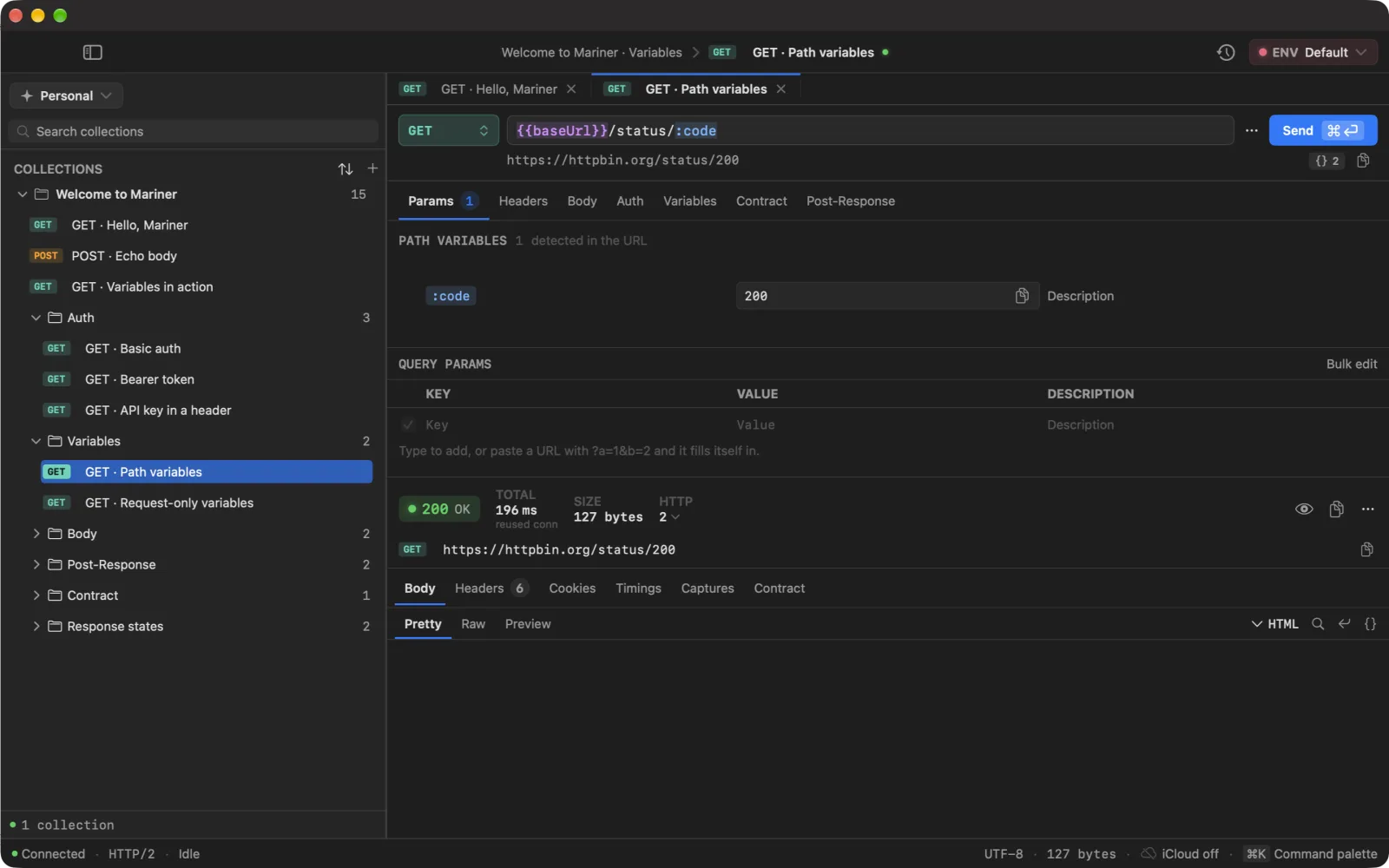
Wrap the name in double braces anywhere a value goes: URL, query parameters, headers, body, auth fields. Mariner resolves it against the active environment when you send.
{{BASE_URL}}/launch/v1/manifests?key={{API_KEY}}With Staging active, {{BASE_URL}} resolves to https://staging.acme-labs.dev. Switch to Production and the same requests point at the real server.
Under the URL field a preview row shows the exact URL that will go on the wire, with secrets masked; the copy button next to it copies the real thing.
In the field itself, a token’s colour tells you its state and the {{ }} / : syntax tells you its family — so the two ways of being broken look the same on both:
- Violet
{{token}}— resolved through the environment cascade. - Blue
:slug— a path variable of this request, filled in. - Amber
{{token}}·:slug— declared, but its value is empty. It substitutes to nothing, which silently drops a path segment. - Red
{{token}}·:slug— not declared anywhere. It goes on the wire literally.
Hovering a token shows its value and which layer it came from.
Switch environments
Three ways, fastest first:
- ⌘E opens the picker from anywhere — arrow to an environment, press ↩.
- ⌘K and type the environment’s name: Switch Environment › Production.
- Click the ● ENV pill in the toolbar.
Choosing No Environment leaves only request-local variables in play. When you switch workspace, Mariner keeps the environment with the same name active if the new workspace has one.
Manage variables
Right-click a variable in the manager for Duplicate, Copy to Environment ▸, Move to Environment ▸ and Delete. Copying or moving to another environment replaces a variable with the same key there — handy for promoting a value from Staging to Production. Right-click an environment for Rename, Duplicate (variables included) and Delete.